Authorization and Access control
GeneTegra is normally configured to use an institutions Authentication Server, such as Active Directory, to authenticate user accounts and link the user with a set of Roles (or user groups) that are permitted to use the system.
Roles
User group assignment is managed by the institution's authentication server (Active Directory). The Role's name is matched against a group in the auth server. GeneTegra users are automatically assigned the Roles that match their assigned Groups.
If a Group exists in the auth server but it doesn't have a corresponding Role, the Group will not be assigned any permissions.
Adding a Role
To add a role, click + Add Role. You must provide a Name.
| Field | Description |
|---|---|
| Name | Name of the Role. Must match name in LDAP/Active Directory |
| Description | [Future Use] |
| Permissions | Audit Logs |
If the Name doesn't match a Group in the Auth server, the Role will not be used.
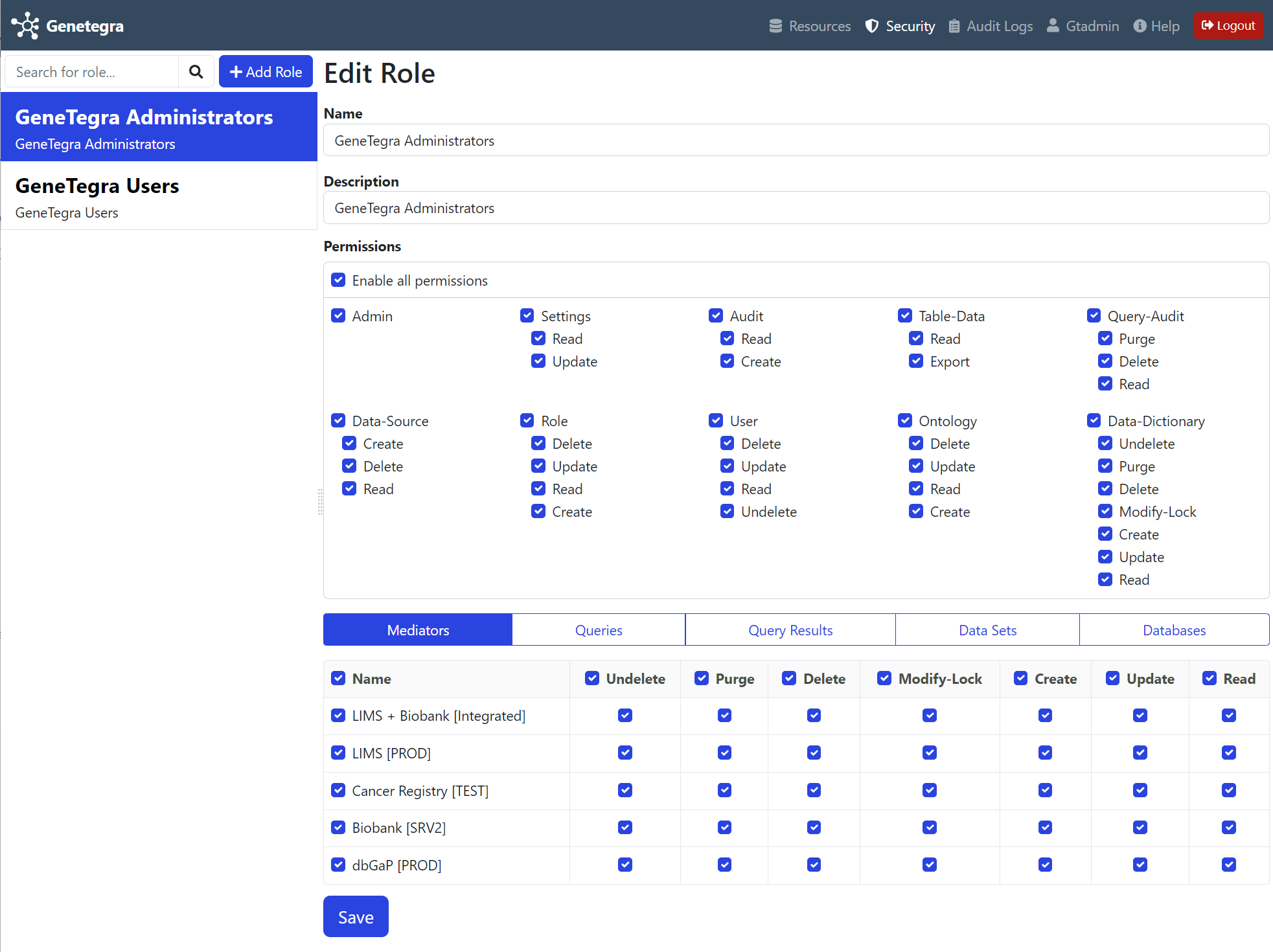 Security configuration for the Administrator account by default enables all permissions.
Configuring Permissions
Permissions are specified as a combination of Type, Action, and Targets. They are all combined together to define an Access Control List.
Permission Types/Domains
Type refers to the general domain of the permission. Some Types define a set of Actions that can be performed. For example, Mediator and Query.
Permissions without a Target
| Type | Description |
|---|---|
| Admin | Administrative features |
| Table-Data | [Future Use] |
| Audit | Audit Logs |
| Settings | [Future Use] |
| Data-Source | [Future Use] |
| Query-Audit | [Future Use] |
| Role | ACL Roles (User Groups) |
| Ontology | Ontologies and Mediator models |
| User | Users |
| Data-Dictionary | [Future Use] |
Permissions with a Target
Target refers to a specific item within the Type. For example, LIMS Mediator.
| Type | Description |
|---|---|
| Mediator | Mediators |
| Query | Queries |
| Query Result | Query Results |
| Data Set | Data files and datasets |
| Database | Database connections |
Permission Actions
Action refers the actions that are allowed within the domain. For example, Read and Execute.
| Action | Description |
|---|---|
| Create | Create a new instance of the Type. [No Target] |
| Read | Read/Access instances of the Type. |
| Update | Update/Modify instances of the Type. |
| Delete | Delete/Archive instances of the Type. |
| Undelete | Undelete/restore archived instances of the Type. |
| Purge | Purges/completely removes an archived instance. Cannot be undone. |
| Modify-Lock | Lock/Unlock an instance so that it cannot be modified. |