GeneTegra Query Builder
Launching the Query Builder begins with selecting either a Mediator or a saved Query in the GeneTegra home page.
The Query Builder starts by loading the Mediator's data model in the left-hand Ontology Tree.
You can explore the Classes, Object Properties, and Data Properties that are defined by the Mediator by clicking on the drop-down arrow icon to show the associated concepts.
 New Query for LIMS Mediator. Classes, Data Properties, and Object Properties are explored in the left-hand Ontology Tree.
Classes may be considered as Tables or Views,
Data Properties as Columns, and
Object Properties as Foreign Key Relationships.
Query Builder Actions
As you are editing a query, you can click on any of the Query Builder Actions at the top of the screen.
 | Run the Query to preview the query results. |
 | Save the Query to the server to reuse or share with other users. Save a Copy creates a copy of the Query. |
 | Clear resets the Query to its saved state, preserving any Custom Relationships. New discards all changes and starts a new Query. |
 | New discards all changes and starts a new Query. If the Query was saved, it can be opened from the GeneTegra home screen. |
 | Projections opens the Projection Editor to reorder how results are presented, configure aliases, and add custom calculations. |
Query Settings
The Query Settings Editor allows you to change the Title, and Description of the Query, as well as configure

| Limit | Sets a maximum number of rows to return in the results. -1 is no limit. |
| Offset | Sets the starting position of the rows. 0 is the start. |
| Distinct | Filters the results to return unique rows. |
| Reduced | Filters the resuts to return unique rows. Like Distinct but doesn't guarantee uniqueness. |
••• Concept Pop-up Menu
Every concept in the Query Tree has a pop-up menu, opened by clicking •••. The choices in the menu will be dependant on the concept type. The top-level concept menu includes an option to Add filter.
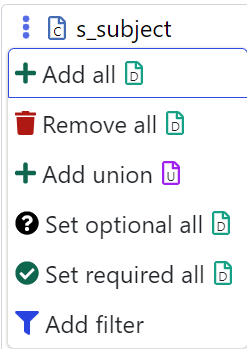
| Add all | Adds all direct descendant data to the query. |
| Remove all | Removes all descendants (data and objects) from the query. |
| Add union | Adds a Union structure for joining multiple sub queries. |
| Set optional all | Sets all descendant data to optional. (Do not require them to have a value) |
| Set required all | Sets all descendant data to required. (Require them to have a value) |
| Add filter | Opens the Filter Builder to add constraints to the query. |